A promo code is a word a buyer types at checkout to get money off. You make your own on the Promotions page, once your shop is verified. A code takes either a percentage or a flat amount off your products. It only ever applies to your share of a cart. If the buyer also has another shop's items in the same order, those are priced as normal.
Making one
Press New code and fill in the form.
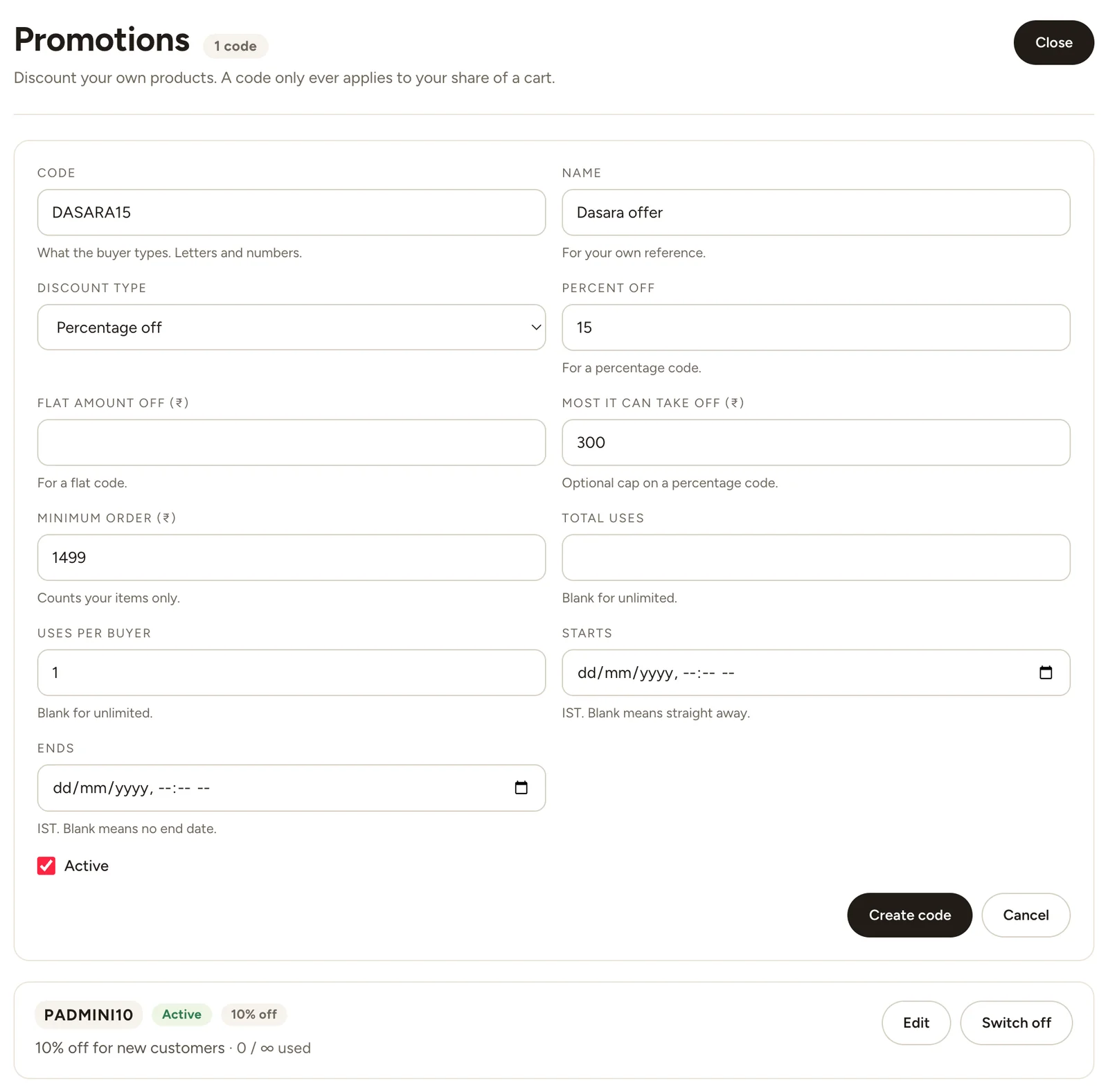
- Code. What the buyer types, in letters and numbers, such as DIWALI10. It is saved in capitals and cannot be changed once made, so if you get it wrong, switch that one off and make another.
- Name. For your own reference, for example "Diwali week, sarees".
- Discount type. Choose Percentage off and fill in Percent off, or choose Flat amount off and fill in the amount in rupees.
- Most it can take off. Optional, for a percentage code. "10% off, up to 200 rupees" stops a big order from taking a big discount.
- Minimum order. Optional. The code only works when the buyer's items from your shop add up to at least this much. Other shops' items do not count towards it.
- Total uses and Uses per buyer. Both optional. Blank means no limit. "First 50 orders" is Total uses 50; "one per customer" is Uses per buyer 1.
- Starts and Ends. Optional, in Indian time. Blank Starts means straight away; blank Ends means it never expires on its own.
Leave Active ticked, as it is when the form opens, and press Create code. The code is live from the start time, and the list shows how many times it has been used.
Switching it off
Press Switch off next to the code. Buyers who type it are told it is not valid, and nothing they have already ordered changes. Switch on brings it back. Edit lets you change everything except the code word and the discount type; press Save changes when you are done.
How it works at checkout
The buyer types the code at checkout and sees the discount as its own line before paying. The discount is worked out on your items only. If the order has items from two shops and each shop gave the buyer a code, only one code can be used per order.
A code cannot waive delivery charges. When Sagazo books the courier, the buyer pays that charge at checkout and it goes to the courier; when you post the parcel yourself, the courier is your own cost. Only Sagazo's own platform-wide codes can touch delivery charges. What you set the price to, and what you take off it, is entirely yours.
Telling buyers about it
Sagazo does not send your code to anyone. Put it in your shop's About line, post it in the feed with a photo of the product, or send it to customers on WhatsApp.