You can change a message you sent for 15 minutes after sending it, and delete it whenever you like. A deleted message goes for everyone in the chat.
Open a message's menu
- On a computer: point at the message and press the smiley that appears beside it.
- In a phone's browser: tap the message. For a photo or a voice note, tap the smiley beside it.
- In the app: tap the message, or press and hold it. A tap on a photo opens the photo, so press and hold a photo or a voice note instead.
On the website this works in Chat, not in the small chat box that opens from a profile or a shop.
The menu has a row of emoji to react with, and Copy for the message's words. Your own messages also have Edit and Delete. Someone else's have Report and Block.
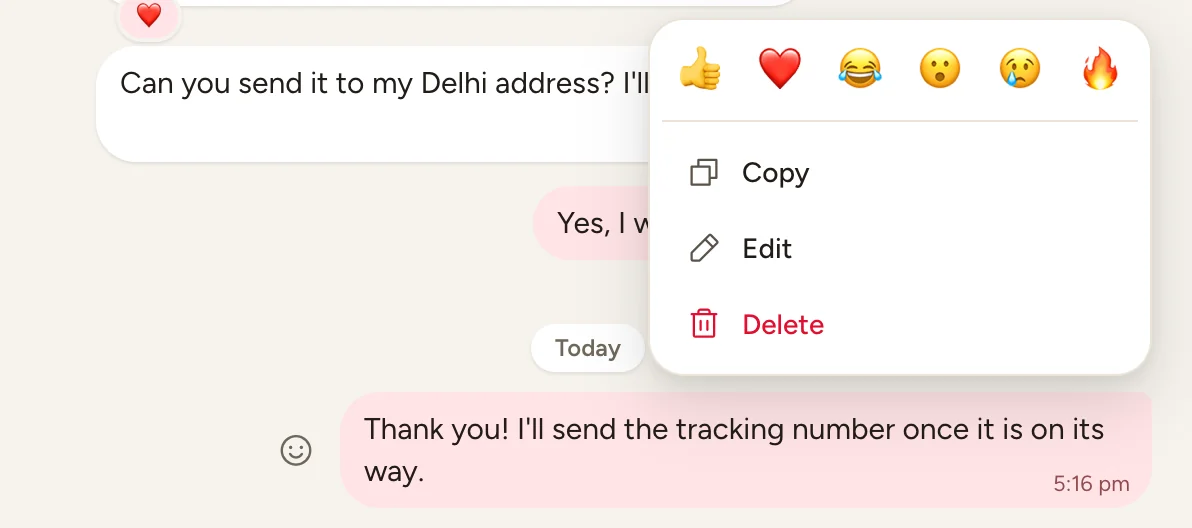
Edit a message
- Open the message's menu and choose Edit. Its words go back into the message box, under Editing.
- Change them and press Send.
Everyone in the chat then sees "edited" next to the message's time. On a photo or a voice note, Edit changes only the words that go with it, and you can remove them. The photo or voice note itself stays as it is.
To stop editing without changing anything, press the cross on the Editing bar. After 15 minutes, Edit is no longer in the menu.
Delete a message
- Open the message's menu and choose Delete.
- When Sagazo asks "Delete message?", press Delete.
The message goes for everyone in the chat, with its photo or voice note. You see "You deleted this message" in its place, and the others see "This message was deleted". You can delete only your own messages, and a deleted message can't be brought back.
Delete a chat from your list
Press the three-dot menu at the top of the chat, then Delete chat, and confirm. This clears the chat from your list only. The other person keeps their copy, and a new message from them brings the chat back to your list, without the older messages. In a circle's chat you stay in the circle, and the other members keep theirs.
Messages someone else removed
- Removed by Sagazo means our team removed the message after someone reported it, and told the person who sent it why. See Something you shared was removed.
- Removed by the circle's admins means the people who run a circle took the message out of its chat. See Chatting in a circle.