You can register for GST online yourself at gst.gov.in, and a proprietor selling from home needs no agent to do it. Part A of the application checks your PAN, mobile number and email with OTPs. Part B is the form itself, with your business details, a photo, proof of address and the goods you sell. Once you submit it, you confirm your Aadhaar with an OTP. On the regular route an officer has seven working days to approve it, and a small seller can instead opt for a route that grants it within three working days. Below are the documents and each step, then what to do once your GSTIN arrives.
Do you need full GST registration?
You need full registration, and the 15-character GSTIN that comes with it, to ship goods to buyers in other states, or once your yearly sales cross your state's limit. If you sell only inside your own state and stay under the limit, the free enrolment number is enough, and GST enrolment for online sellers covers that route. When an online seller needs GST explains where the line falls.
You do not need a company. Someone selling from home registers as a proprietor with their own PAN, as whether you need to register a company to sell online explains. The law gives you 30 days to apply once you become liable, but it is simpler to register before your first order from another state.
Do you need an agent or a CA?
No. The rules let you apply directly on the portal, and the application form's instructions say no fee is payable for filing it. If you pay a CA to file it, you pay for their time.
What to keep ready
Gather these first, because a draft you do not submit within 15 days of starting is deleted.
- Your PAN. A proprietor uses their own PAN, and the legal name on the form is the name on the PAN.
- Your mobile number and email, ideally those linked with your PAN in the income tax records, since the rules send the Part A OTPs there.
- Your Aadhaar and the phone linked to it, because the Aadhaar OTP goes to the mobile and email linked with your Aadhaar.
- A photo of yourself as a JPEG file of up to 100 KB.
- Proof of your place of business, scanned as a PDF or JPEG of up to 1 MB.
- The HSN codes of the goods you sell. The form takes up to five, and HSN codes for home sellers lists the common ones.
Bank details are not needed until after approval.
Proof of address when you sell from home
The address you register is your principal place of business, which for a home business is your home. The proof depends on who owns it.
If the house is yours, upload the latest property tax receipt, a municipal khata copy or an electricity bill. If you rent, upload a valid rent or lease agreement with one of those documents in the owner's name. With no agreement, or an expired one, the portal's document list accepts a rent receipt with a no-objection certificate, an NOC, from the owner in its place. In a parent's or a relative's house, upload the owner's consent letter with one of their ownership documents, such as the khata copy or the electricity bill. A shared property works the same way.
Part A: PAN, mobile number and email
On gst.gov.in, go to Services, then Registration, then New Registration. Choose Taxpayer in the first list, then your state and district. Type your name exactly as it is on your PAN, then the PAN, your email, your mobile number and the captcha. Check the state, because it cannot be changed later.
The portal sends one OTP to your mobile and a different one to your email, each valid for ten minutes. Enter both, and it shows your Temporary Reference Number, the TRN, which also comes by SMS and email.
Part B: the application form
Go back to New Registration, choose TRN, and log in with it and a fresh OTP. In Business Details, give your shop's name as the trade name and choose proprietorship as the constitution of business. Answer No to the composition scheme if you want to sell to other states, because the law bars a composition taxpayer from such sales.
Add your own details and photo as the proprietor, and name yourself, or whoever signs for you, as the authorised signatory. Enter the address and upload the proof under Principal Place of Business. Add the HSN codes under Goods and Services, where typing a word such as cotton brings up a list. Leave Aadhaar Authentication at Yes.
To submit, tick the declaration, choose the signatory, type your town and sign. A proprietor can sign with EVC, an OTP to the mobile and email given in the form, or with E-Signature, an OTP to the mobile linked with Aadhaar. A digital signature certificate is needed only for companies and LLPs.
The Aadhaar check, and when you visit a GST centre
After you submit, the portal checks your PAN and sends an Aadhaar authentication link to your mobile and email, valid for 15 days. Open it and enter your Aadhaar number and the OTP that follows. The portal then issues your Application Reference Number, the ARN, by email and SMS. Track it under Services, Registration, Track Application Status.
Based on its risk checks, the portal asks some applicants to come in person instead. If you are picked, you book a slot at a GST Suvidha Kendra, a facilitation centre, for biometric Aadhaar authentication, a photo and a check of your original documents. This must be done within 15 days of submitting the form, or no ARN is issued. Since July 2024 this can happen in any state.
If you answer No to Aadhaar authentication, you visit a centre anyway for the photo and the document check, and an officer inspects your place of business before granting the registration. Answering Yes is quicker.
The simplified route: registration in three working days
Since 1 November 2025, you can opt for registration under Rule 14A of the CGST Rules, a scheme the GST Council recommended in September 2025. It is open to you if the GST on your sales to other GST-registered businesses will not exceed ₹2.5 lakh a month. Sales to households and other unregistered buyers do not count, so for a seller who sells only to households the figure is zero. At 5% GST, it takes ₹50 lakh of sales to registered businesses in a month to reach ₹2.5 lakh of tax.
You must choose Aadhaar authentication to use it. Once the Aadhaar OTP succeeds, the portal grants the registration within three working days. You can hold one such registration per PAN in each state. Before the tax on your sales to registered businesses goes past the limit, you must leave the scheme with form REG-32. You can file REG-32 only after you have filed returns for at least one tax period, with none pending and no cancellation case open against you.
The portal can also approve a low-risk application within three working days on its own, even if you did not opt in.
How long approval takes, and the certificate
On the regular route, the rules give the officer seven working days from submission to approve. If you skipped Aadhaar authentication, or your premises are picked for a check, the limit is 30 days.
If something is missing, the officer sends a notice seeking clarification, form REG-03. You reply in form REG-04 within seven working days, and if the reply satisfies the officer, the registration is approved within seven working days of it. No reply, or an unsatisfactory one, can lead to rejection in form REG-05. If the officer does nothing within these limits, the application is treated as approved.
The decision comes by email. The certificate, form REG-06, is not posted: you download it under Services, User Services, View/Download Certificate. At your first login, the portal asks for your bank account. You have 30 days from the grant to add it, or until you first report your sales to the portal, if that comes sooner. A personal account is fine until a business account is open, with a bank statement or your passbook's first page as proof.
What the 15 characters of a GSTIN mean
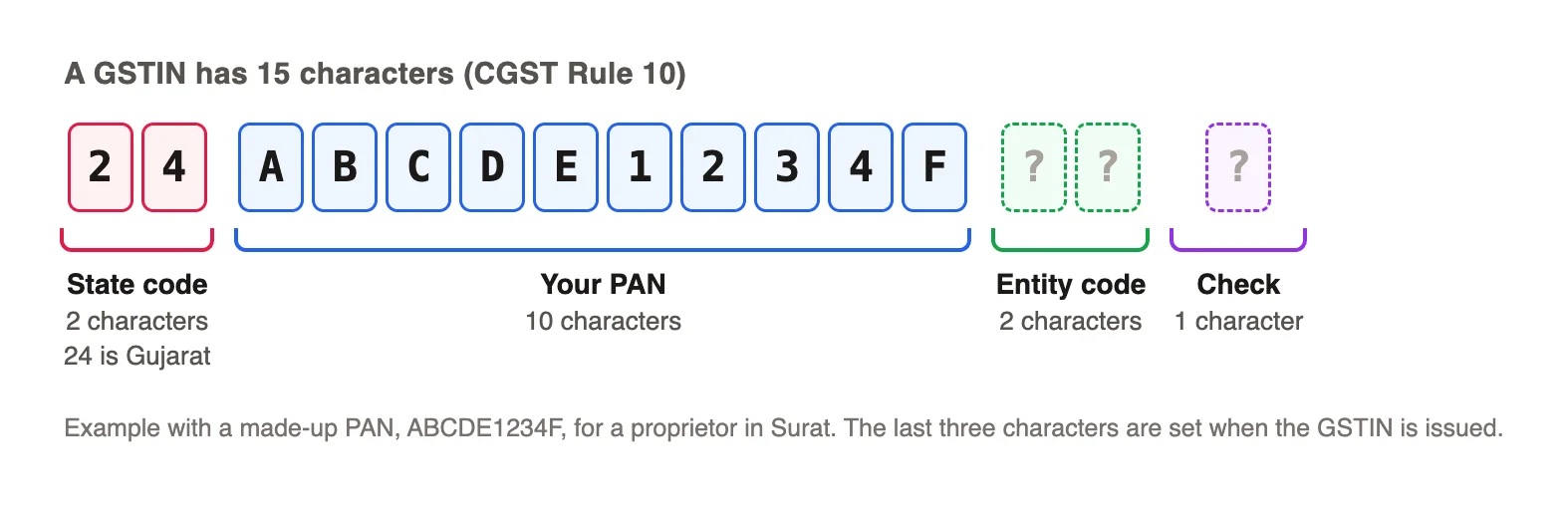
Under the rules, the first two characters of a GSTIN are the state code, such as 24 for Gujarat, 27 for Maharashtra, 33 for Tamil Nadu or 36 for Telangana. The next ten are your PAN. Then come two characters called the entity code, and the last one is a check character. With a made-up PAN, ABCDE1234F, a proprietor in Surat would get a GSTIN beginning 24ABCDE1234F.
Once you have your GSTIN
- Display it. The rules ask you to show the certificate prominently at your principal place of business, and the GSTIN on the name board at its entrance.
- Your GSTIN goes on every tax invoice you issue, and what a GST invoice must show lists the rest.
- Your returns start from the effective date of registration: the date you became liable if you applied within 30 days of it, otherwise the date of the grant.
- If you close the business, apply to cancel the registration in form REG-16 within 30 days of closing.
Selling on Sagazo
Selling on Sagazo is free. There is no commission and no listing fee. Once your GSTIN arrives, enter it in the Tax panel of your shop settings. Because you are registered, 0.5% TCS, tax collected at source, is deducted on payments made through Sagazo and deposited against your GSTIN, and you claim it back in your returns.
Tell us about your shop on the become a seller page and we will help you get set up.
Once your shop is open, the help centre explains where your GSTIN goes in shop settings and how the 0.5% TCS is held back and claimed.
This post is general information, not tax advice. Rules change, so check gst.gov.in or ask a CA for your own case.