You can react to a post with one of seven emoji. You have one reaction on each post, and picking another one replaces it.
The seven reactions
Sparkle, Love, Like, Fire, Haha, Wow and Pray. The same seven work on comments, and on the products mixed into Trending. The app doesn't have Like yet.
How to react
- On a computer: point at the heart and the seven appear. Click one. A click on the heart itself gives Love.
- In a phone's browser: tap the heart to open the seven, then tap one.
- In the app, on a post in a feed: tap the heart to open the reactions. Pressing and holding anywhere on the post opens them too.
- In the app, on a post's own page and on comments: tap the heart for Love, or press and hold it for the reactions. Once people have reacted, the heart shows their most used emoji instead, and works the same way.
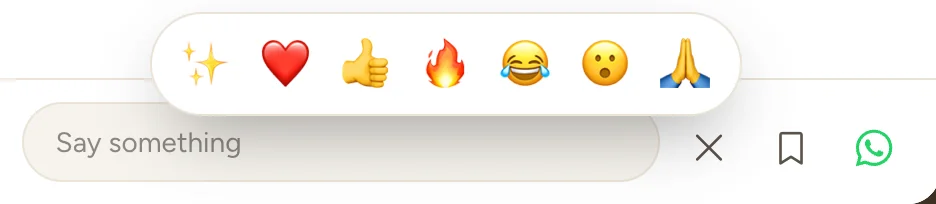
You need to be logged in to react.
Change or take back a reaction
Your reaction takes the heart's place, so you can see what you picked. To change it, pick a different one. To take it back:
- On a computer, click your reaction.
- In a phone's browser, or on a post in the app's feed, open the reactions and tap the one you picked.
- In the app, on a post's page or a comment, tap your reaction.
What people see
In a feed, a post shows only your own reaction and how many reactions it has in all. On a post's page on the website, you also see the emoji people picked most.
All the reactions count the same toward a post's place on Trending. See How Trending, Latest and Following work.
Who is told
When you react to a post, its author gets a notification, once. Changing your emoji doesn't send another, and taking your reaction back removes it. Reactions on comments and products send no notification.
The Post Activity switch in Settings decides whether these notifications alert you. See Notifications and what each switch does.