Press Create a Post, write something and press Publish. You need to be logged in.
Where to start
- On the website: press Create a Post in the menu on the left. On a phone, tap Post at the bottom of the screen, or open the menu at the top left and press Create a Post.
- In the app: tap the round + button in the middle of the bar at the bottom.
- In a circle you are a member of: press Post in this circle, and the post goes into that circle.
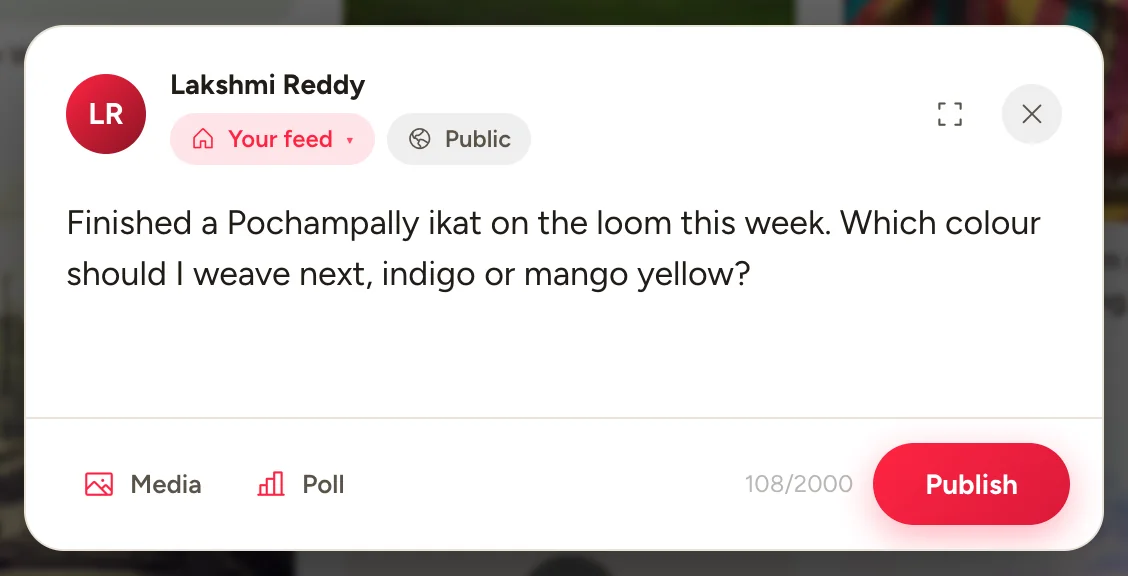
Write your words
Every post needs words, up to 2000 characters. On the website, the count next to Publish shows how many you have used. Photos and videos go with your words, not instead of them.
A word that starts with #, such as #handloom, shows under the post as a tag. Tags are labels only: tapping one does nothing.
Choose where it goes
Near the top, a button reads Your feed. Press it to choose where the post goes:
- Your feed: when the post is public, it shows on your profile and in Following for people who follow you, and it can show on Trending and Latest.
- One of your circles: the post goes into that circle. In a private circle, only its members see it.
The list shows only circles you are a member of, and suggests a few to join if you have none. A circle with its own rules shows a line you can open to read them. Once a post is published, it can't move into a circle or out of one.
Who can see the post is a separate choice, Public or Only me. See Public and private posts.
Mention someone
Type @ and the start of a person's name or username, then pick them from the list. People with a private profile don't show in it. You can pick a circle from the same list, and the post then shows that circle's card.
The people you mention get a notification once they can open the post:
- Not while it is set to Only me. If you make it Public, they are told then.
- Not while it waits for review. They are told once it is approved.
- Not before its video is ready. They are told when it is.
- In a private circle, only the circle's members are told.
Only the first 10 different people you mention are told. People you blocked, or who blocked you, aren't told, and neither is anyone who switched off Mentions in Settings. When you edit a post, only the people the edit added are told.
Publish
Press Publish, at the top right in the app. Sagazo says "Posted." or names the circle you posted in. If something goes wrong, it says "Couldn't post just now. Try again." and keeps your words.
You can share up to 20 posts an hour. After that, Sagazo says "You've shared a lot of posts in a short time." and tells you when you can post again.