Open your post and press the three-dot menu at the top. Choose Edit to change it, or Delete to take it down for good.
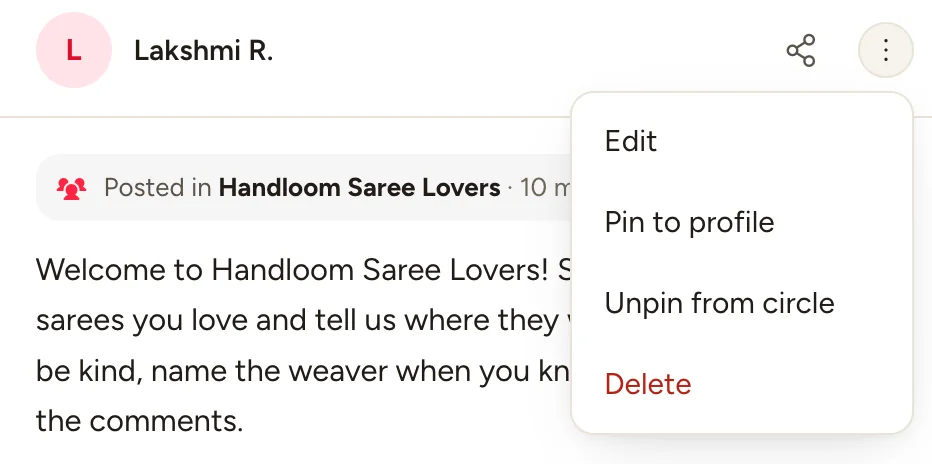
Edit a post
- Open the post, press the three-dot menu and choose Edit.
- Make your changes.
- Press Save. Sagazo says "Post updated."
You can change:
- the words
- the photos and videos: take some out, or add more, up to 5 in all
- whether it is Public or Only me
- the link and circle cards: the cross on a card takes it off
You can't change where the post is (your feed or a circle), and you can't change a poll or add one. The post keeps the same web address, so links people shared still work. There is no time limit on editing.
An edited post shows Edited next to its date. If you mention someone new, only they are told, not the people you had already mentioned.
If your new words include one on our review list, the post waits for our team again, and Sagazo says "Saved. Our team will check it before others can see it, because it has a word we review." See Why a post is waiting for review.
You can't edit a post while it waits for review, or after it was removed. You can still delete it.
Delete a post
- Open the post, press the three-dot menu and choose Delete.
- Sagazo asks "Delete this post?" and warns "This can't be undone. Your post will be removed for everyone."
- Press Delete. Sagazo says "Post deleted."
Everything on the post goes with it: its reactions, its comments and their replies, other people's included, and its poll votes. We delete its photos and videos from our storage. Anyone who saved the post loses it from their saved posts. There is no bin and no undo.
If you only want to hide a post for now, set it to Only me instead. See Public and private posts.
When someone else takes a post down
Nobody else can edit or delete your post. Our team can remove a post that breaks our rules, and a circle's admins can remove a post from their circle. Either way, you get a notice. See Something you shared was removed.