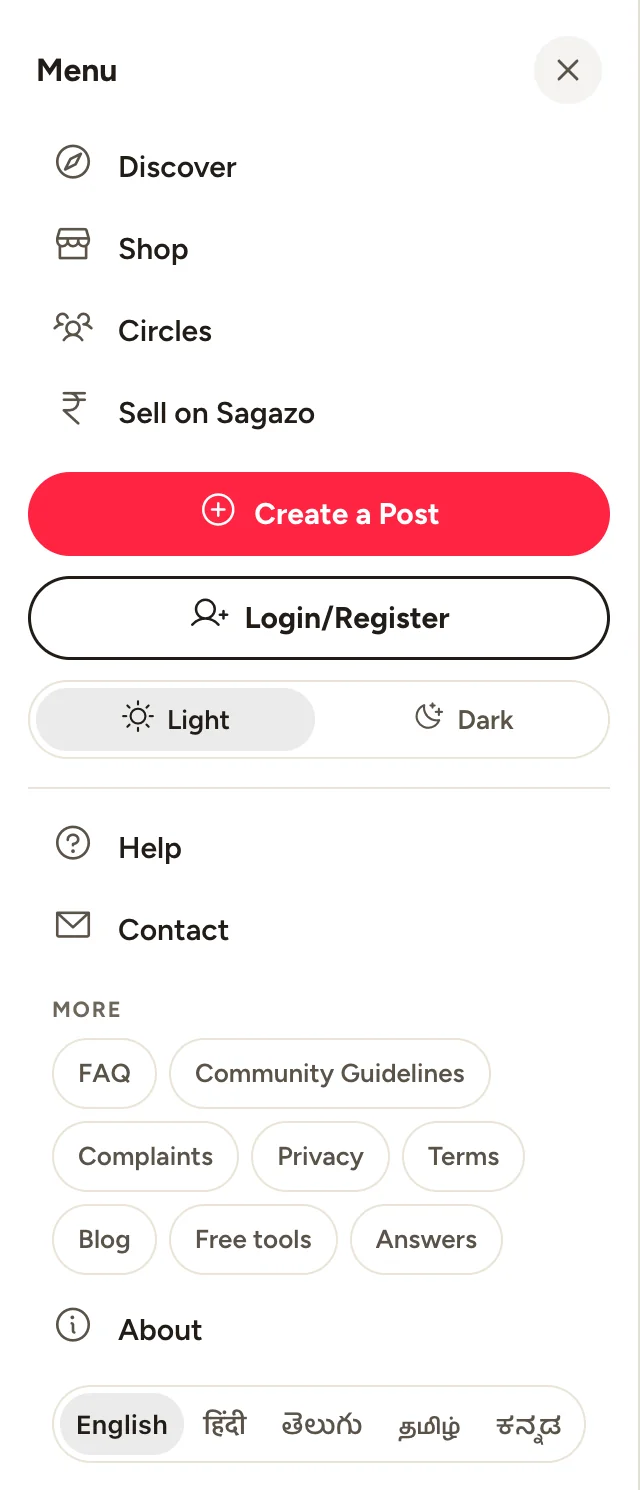
Sagazo, the social media and shopping app built in India, is in five languages: English, Hindi, Telugu, Tamil and Kannada. In your phone's browser, tap the menu button, the three short lines at the top left of the screen, and pick हिंदी, తెలుగు, தமிழ் or ಕನ್ನಡ near the bottom of the menu. On a computer, the language button is at the top right of the page. The page reloads in the language you picked, and Sagazo remembers your choice. This post covers what changes when you switch, which pages have their own Hindi, Telugu, Tamil and Kannada versions, how Sagazo picks a language on your first visit, and what stays as it was written.
How to change the language on a phone
Open sagazo.com in your phone's browser and tap the menu button, the three short lines at the top left. A menu slides in from the left. Near the bottom of it, just above Log out if you are signed in, you will see five buttons in a row: English, हिंदी, తెలుగు, தமிழ் and ಕನ್ನಡ. The one you are using is shaded. Tap another, and the page you were on reloads in that language. You do not need to be signed in to switch.
How to change it on a computer
At the top right of the page is a button with the name of the language you are using. It sits just left of the Become a seller link, which reads Manage Shop if you have a shop. Point at the language button, or reach it with the Tab key, and a small list opens: English, हिंदी, తెలుగు, தமிழ் and ಕನ್ನಡ, with a tick beside the one in use. Click the one you want.
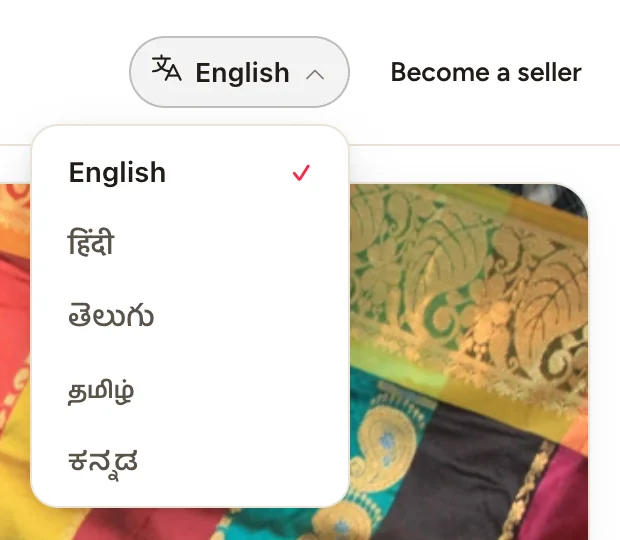 Photo in the screenshot: kvkamal120, CC BY 2.0, Flickr.
Each name is written in its own script, so someone who reads only Telugu can spot తెలుగు on an English page. If your browser window is narrow, Sagazo switches to its phone layout, and the language row moves into the menu.
What changes when you switch
Most of the words Sagazo itself puts on the screen change: buttons, menus and tabs, the search box, the sign-in screens and the short messages that confirm what you did. That covers the feed, the shop and product pages, Circles, chat, your profile and your settings. If you are new here, what Sagazo is walks through the feed, the shop and Circles.
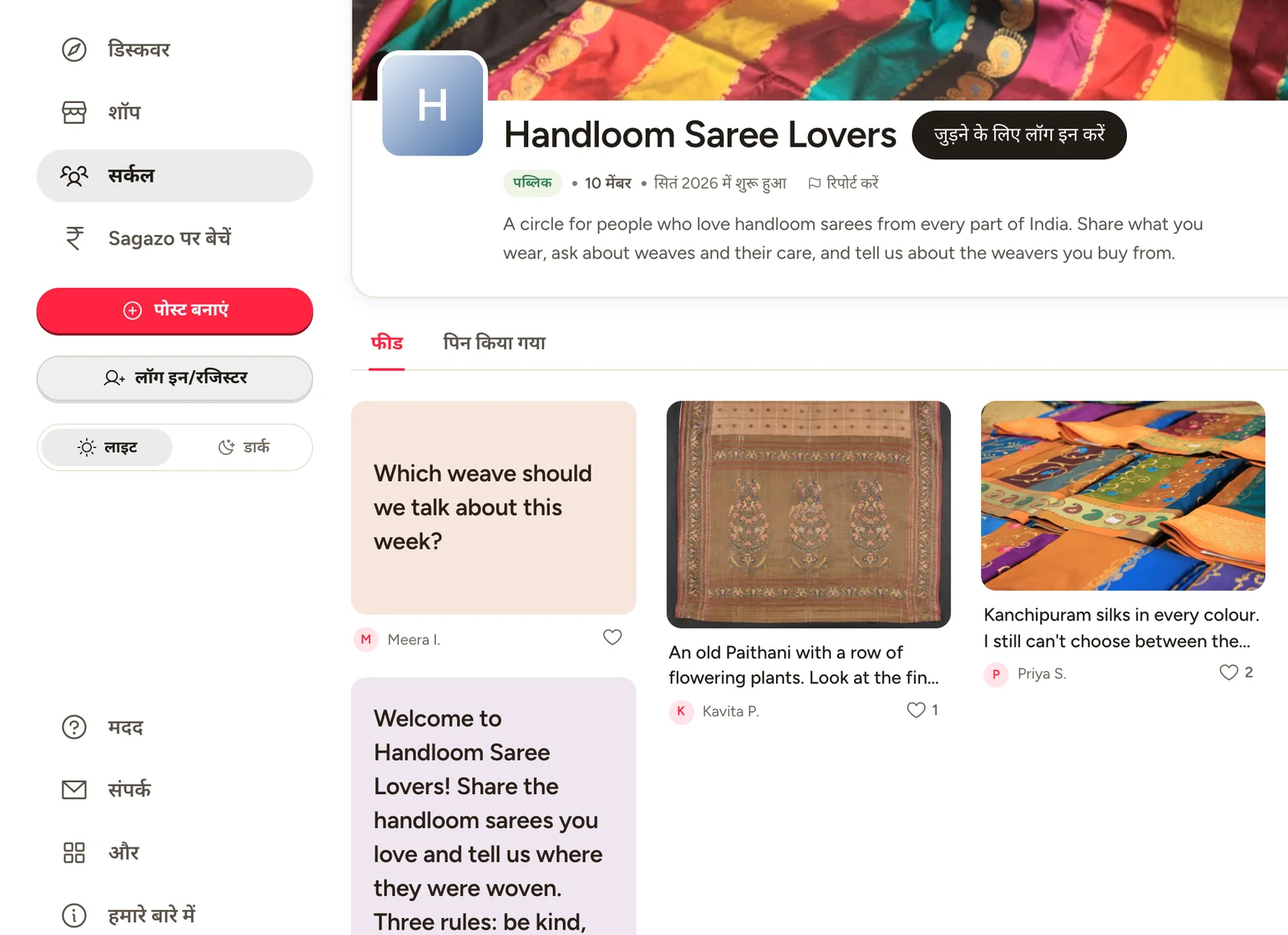 Photos in the screenshot: kvkamal120 and Fæ, CC BY 2.0, Flickr.
Some pages go further and have full Hindi, Telugu, Tamil and Kannada versions of their own. These are the blog, the help centre for everyone, the seller help centre, the FAQ, the about page, the privacy policy, the terms, the community guidelines, the pages on prohibited items, complaints and copyright, the free tools for sellers, the contact page and the become a seller page. Each version has its own web address with /hi/, /te/, /ta/ or /kn/ in front. The FAQ in Hindi is at sagazo.com/hi/faq, in Telugu at sagazo.com/te/faq, in Tamil at sagazo.com/ta/faq and in Kannada at sagazo.com/kn/faq. If you switch language while reading one of these pages, you land on the same page in the new language.
A link to a Hindi, Telugu, Tamil or Kannada page opens in that language for whoever taps it, so you can send a Telugu help page to a friend who reads Telugu. Opening it does not change the reader's own language setting. The translated versions of the privacy policy and the terms say at the top that where they differ from the English, the English version applies.
How Sagazo picks and remembers your language
Your phone or browser tells websites which languages it is set to, in order of preference. The first time you open Sagazo, it reads that list. It opens in whichever of English, Hindi, Telugu, Tamil and Kannada comes first on the list, or in English if none of them is on it.
Once you pick a language yourself, your choice wins. Sagazo keeps it for a year in a small language cookie in your browser, and our privacy policy lists this cookie. If you are signed in when you pick, the choice is also saved on your account. Sign in on another phone or computer and Sagazo opens in your language there too, unless a different language was already picked in the browser you are using.
What does not change
Sagazo does not translate what people write. Posts, comments, chat messages, people's names, shop names, product names and descriptions, and the names of Circles all appear exactly as their authors typed them. A post written in Telugu stays in Telugu for someone reading Sagazo in English, and an English caption stays English on a Hindi screen.
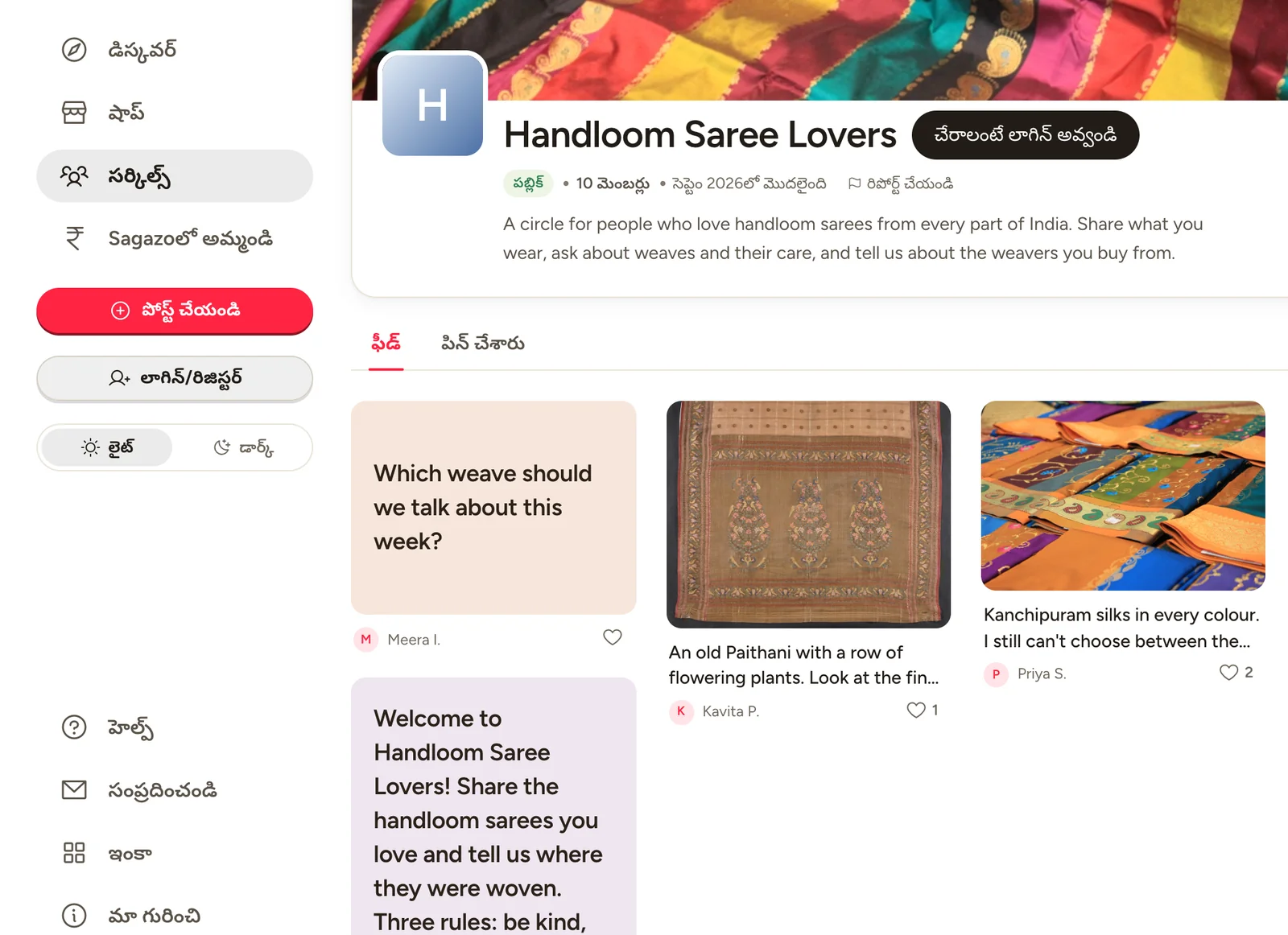 Photos in the screenshot: kvkamal120 and Fæ, CC BY 2.0, Flickr.
A few parts of Sagazo are in English whichever language you pick. The seller console, where shop owners add products and handle their orders, is in English, and so is the console our moderators use. The names of shop categories, such as Women's Fashion and Sarees, are in English. So are a few error messages and the lines in your notifications, such as "Asha V. reacted to your post". The one exception is the notice about Sagazo's rules, which comes in the language saved on your account.
Writing in your own language
Sagazo's own buttons come in five languages, but you can write in any language you like. Nothing limits a post, a comment, a chat message or the name on your profile to English letters, so you can post in Hindi, Telugu, Tamil, Kannada, Bengali or a mix of them. Your username works differently: the handle after the @ sign takes only small English letters, numbers and the underscore. If you write your name in Hindi, Telugu, Tamil or Kannada when you sign up, Sagazo gives you a username such as user4821, and you can change it in Settings.
This works for groups too. A Circle can have a Hindi, Telugu, Tamil or Kannada name, and its members can post and comment in that language. How Sagazo Circles work explains joining and starting one.
Why Sagazo is in more than one language
We built Sagazo for India first, and English is one language among many here. In the 2011 Census, about 52.8 crore people gave Hindi as their mother tongue, or a mother tongue the Census groups under Hindi, such as Bhojpuri. That is more than any other language. About 8.1 crore gave Telugu, the fourth largest. About 6.9 crore gave Tamil, the fifth, and about 4.4 crore gave Kannada, the eighth. Someone who reads Hindi, Telugu, Tamil or Kannada all day should not have to switch to English to use Sagazo. Why we built Sagazo for India first explains the rest of that thinking.
Selling in Hindi, Telugu, Tamil or Kannada
If you sell, write your product names and descriptions in the language your buyers read, or in two languages side by side, such as English and Hindi. The product form accepts any language, and buyers see your words exactly as you typed them, whatever language they have picked. The become a seller page and its sign-up form are in Hindi, Telugu, Tamil and Kannada too. Selling on Sagazo is free. There is no commission and no listing fee, so a saree you sell for ₹700 pays you ₹700, as in the worked example in how to start a saree business.
Tell us about your shop on the become a seller page and we will help you get set up.
The seller help centre is in Hindi, Telugu, Tamil and Kannada as well, with the console's button names left in English as they appear on screen, so how to add a product matches what you see.
Try Sagazo in your language
Open the Sagazo feed and switch the language as the steps above show. You can read the feed without an account, and you sign in with your phone number and a one-time code when you want to post, comment or join a Circle.